Frequently asked Questions
FAQ — Venture Consultants AI
What does Venture Consultants AI do?
We build custom Progressive Web Apps (PWAs) enhanced with AI automation, and we build every product for you — PWAs, AI agents, digital menus, food ordering systems, e‑commerce platforms, automations, and more. Everything runs on our proprietary technology, refined over 12+ years.
Do you include SEO in each build?
Yes. Every PWA includes SEO‑optimized content, metadata, and structure for stronger Google rankings. We also include LLM SEO, which prepares your business to be found by AI search engines like ChatGPT and Gemini.
What is LLM SEO?
LLM SEO optimizes your business for AI‑driven search, where customers ask questions and AI provides direct answers. It helps your business appear in:
- AI recommendations
- Conversational search
- Voice‑driven queries
- AI‑generated results
As AI becomes the primary search method, LLM SEO ensures your business stays visible.
How can AI improve my business?
Our AI handles tasks that slow you down — answering questions, booking appointments, following up with leads, making outbound calls, sending reminders, and providing instant customer support 24/7.
Can the AI speak different languages?
Yes. Our AI supports multiple languages, including Spanish. We also offer a dedicated Spanish PWA build for businesses serving bilingual or Spanish‑first audiences.
Do customers need to download an app?
No. Your PWA installs directly from your website with one tap and works on:
- iPhone
- Android
- Tablets
- Windows
- Mac
- Chromebooks
Your business gets a true home‑screen app icon without the App Store.
Is everything branded for my business?
Yes. Your PWA and AI are fully customized — colors, layout, features, and even the AI’s personality match your brand.
Do you build everything for me?
Yes. Every product is fully done‑for‑you, including:
- PWA creation
- AI setup and training
- Menu builds
- Food ordering systems
- E‑commerce builds
- Automations
- Integrations
- Branding
- Unlimited revisions
You focus on your business — we handle the tech.
How long does setup take?
Most businesses launch within a few days. We handle the build, configuration, and deployment.
Can your system integrate with tools I already use?
Yes. We integrate with booking systems, calendars, CRMs, and e‑commerce platforms.
How does outbound calling work?
Your AI can automatically call leads, confirm appointments, send reminders, and follow up on inquiries. All interactions are logged.
Is the system secure?
Yes. We use enterprise‑grade encryption and have passed SEC‑level compliance standards.
Do you offer ongoing support?
Yes. We provide continuous updates, monitoring, and unlimited revisions until you’re satisfied.
What is your refund policy?
We operate with a no‑refund policy. You may cancel anytime to avoid future charges.
Food & Retail Features
Do you offer a Food Ordering System?
Yes. We build a complete Food Ordering PWA supporting takeout, dine‑in, curbside, delivery, multi‑location routing, push notifications, and AI‑powered menu assistance.
Do you build digital menus?
Yes. We create interactive, mobile‑first digital menus with photos, videos, pricing, dietary tags, specials, and more. Customers can access them via QR code or your PWA.
Can I update my menu easily?
Yes. You receive 4 monthly updates included.
Can the AI help customers with menu questions?
Yes. The AI can answer questions about ingredients, allergens, availability, and make personalized suggestions — in English or Spanish.
E‑commerce & Growth Tools
Do you offer e‑commerce PWAs?
Yes. We build custom e‑commerce PWAs with mobile‑first checkout, product tracking, referral systems, and AI‑assisted sales.
What is your Product Tracking Referral System?
It’s a built‑in system that tracks when customers share your products or services and shows exactly who referred who. It includes:
- Unique share links
- Real‑time tracking
- Customer‑level attribution
- Automated rewards
- AI follow‑up
This system is unmatched in the industry because it combines PWA technology, AI automation, and referral tracking in one platform — no third‑party apps required.
Do you support online payments?
Yes. We integrate with Stripe and PayPal.
Can customers add the store to their home screen?
Yes. Your e‑commerce PWA installs directly onto any device for instant access and repeat sales.
White‑Label & Additional Services
Do you offer white‑label options?
Yes. We offer full white‑label platform licensing for agencies and enterprise partners. Contact your rep or the home office.
What other services do you offer?
- AI voice agents
- Mobile‑first PWAs
- E‑commerce
- Food ordering systems
- Real estate platforms
- Online academies
- Podcast hosting
- Custom automations
- Branding and design
- White‑label reseller programs
Technology & Performance
What are adaptive websites?
Adaptive websites automatically adjust layout, speed, and content based on device type, screen size, user behavior, and connection speed. They deliver a faster, more personalized experience.
Why are adaptive websites better than drag‑and‑drop responsive builders?
Responsive builders simply shrink or stretch the same layout. Adaptive sites intelligently optimize for each device, resulting in:
- Faster load times
- Higher conversions
- Better mobile experience
- Stronger SEO
- A more app‑like feel
Our platform is built on adaptive, mobile‑first technology, future proof.
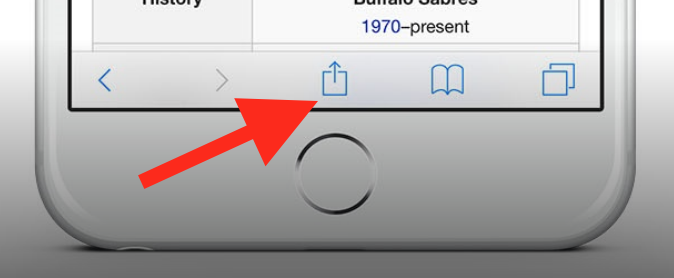
To add this web app to your homescreen, click on the "Share" icon
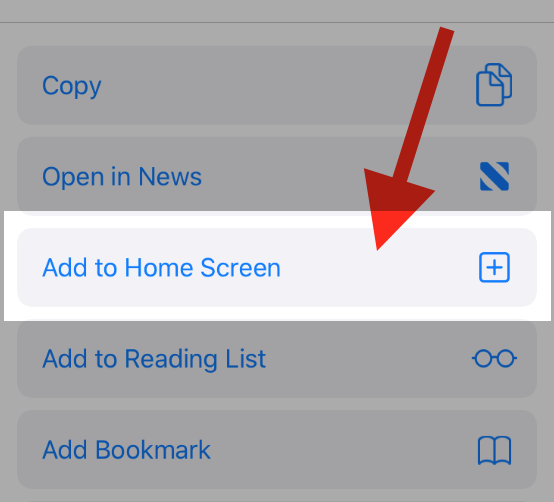
Then click on "Add to Home"
To add this web app to your homescreen, click on the "Share" icon
Then click on "Add to Home"
It looks like your browser doesn't natively support "Add To Homescreen", or you have disabled it (or maybe you have already added this web app to your applications?)
In any case, please check your browser options and information, thanks!
It looks like your browser doesn't natively support "Add To Homescreen", or you have disabled it (or maybe you have already added this web app to your applications?)
In any case, please check your browser options and information, thanks!